If you’re part of the logistics industry, you know how chaotic things can get, especially when it comes to shipping. To maximise efficiency and make day-to-day shipping operations easier, you can look for storage solutions to help you keep your warehouse organised and add a label printer to each packing station.
Printing shipping labels can save you time and money. It may sound simple, but the truth is that things can easily go wrong and even a small mistake can cost you a lot. If the text on the shipping label is not printed correctly and the barcode is not legible, it can cause problems for the carrier, your customers’ orders could be mishandled or lost, creating a bad customer experience and damaging brand loyalty.
To ensure professional-looking shipping labels that will display the information carriers need to deliver packages, it’s essential to invest in a high-quality printer. Whether you’re a business owner or an individual seller on an e-commerce platform, you can shop for shipping label printers. They streamline the shipping process by saving time, reducing errors and improving accuracy, and play a crucial role in the smooth operation of any business that deals with shipping and logistics.
Instead of manually writing or printing labels on regular paper, this type of printer allows you to print labels effortlessly. Each label provides important information about the package, such as the sender’s and recipient’s address, tracking numbers, barcodes, weight, shipping method and more.
Tips on How to Choose the Right Shipping Label Printer for Your Needs
There are many different options available, so here are a few tips that can help you narrow down your selection.
Printing Technology: Thermal vs. Inkjet Printers
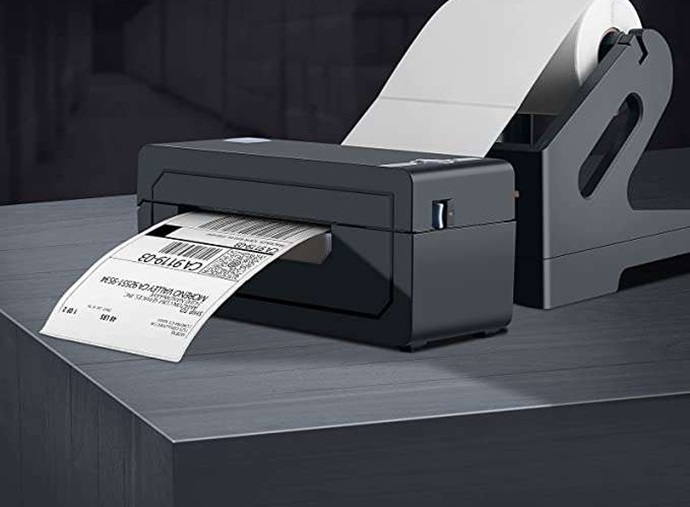
A thermal shipping label printer is the most popular option for printing shipping labels, QR codes, custom stickers, and product information. It’s ideal for high-volume needs, it uses direct thermal tech for cost-effective and durable prints, offers superior printing speed and doesn’t need ink or toner.
An inkjet printer, on the other hand, uses an ink cartridge for colour prints and requires ongoing ink replacement. It’s suitable for businesses that need colour and/or customisation options.
Connectivity Options
Consider the connectivity options of the shipping label printer machines, such as wireless, Bluetooth and USB, to ensure compatibility with your devices and convenience in the printing process.
A label printer with a USB connection is ideal for desktop setups. It’s a reliable solution that connects directly to your computer. A printer with a Bluetooth connection, on the other hand, wirelessly connects mobile devices, like smartphones and tablets, and is ideal for on-the-go label printing.
A wireless shipping label printer enables communication with both computers and mobile devices. It offers flexibility and is designed to meet various remote printing needs. To opt for the right connectivity, keep your specific needs and preferences in mind.
Reliable Brands
When it comes to shipping label printers, selecting a brand known for consistency and longevity is crucial. Reliable brands offer not only robust hardware but also dependable customer support and warranty options. These brands have established reputations in the logistics, e-commerce, and warehousing industries.
TSC
TSC (Taiwan Semiconductor Co.) is recognised for offering a comprehensive lineup of thermal label printers tailored to various business sizes and applications. Their printers are known for their durability and reliability, even in challenging environments such as warehouses and manufacturing plants.
TSC also supports both direct thermal and thermal transfer printing, giving businesses flexibility depending on their needs. The brand frequently updates its models with user-friendly features like intuitive controls and network connectivity, enhancing ease of use.
Zebra
Zebra Technologies is a leading name in the industrial and commercial printing space, especially for high-volume label printing. Zebra printers offer robust performance and reliable solutions for demanding environments like distribution centers and healthcare settings.
They are widely praised for their fast print speeds, precision, and extensive software compatibility. Many of their models come with advanced connectivity options (e.g., Bluetooth, Wi-Fi, USB), and they integrate seamlessly with major shipping and inventory management systems.
Brother
Brother is a household name, but it also has a strong presence in the business label printing sector. They’re known for their user-friendly interface, durability, and reliability, making them an excellent choice for small to medium-sized businesses.
Brother’s label printers often feature plug-and-play functionality, wireless printing, and compatibility with mobile devices. Their compact designs make them ideal for retail, home-based businesses, or offices with limited space, without sacrificing performance.
DYMO
DYMO specializes in direct thermal label printers, which eliminate the need for ink or toner, reducing ongoing operating costs. They use direct thermal printing technology and are designed for efficiency and ease of use, particularly for small businesses and individual entrepreneurs.
DYMO printers are often compact and highly portable, perfect for environments with limited space. With simple setup processes and integration with popular e-commerce platforms like Etsy, eBay, and Amazon, they streamline the labelling workflow for users.
GoDEX
GoDEX is a lesser-known but highly respected brand in the thermal printer industry, often praised for delivering solid performance at a more affordable price point. They offer reliable shipping label printers that are affordable and efficient, making them a good choice for startups or budget-conscious businesses.
GoDEX printers support a wide range of label sizes and are compatible with major label design software. Many of their models feature easy maintenance and durable construction, suitable for both light and heavy-duty use.
Size of Shipping Labels
To make sure the printer you choose matches the size of the shipping labels you want to use, consider the requirements of your shipping carrier.
In Australia, major carriers like Australia Post, StarTrack, CouriersPlease, and Sendle typically require standard label sizes such as 100mm x 150mm, though requirements can vary depending on the type of service or parcel. Some platforms or courier integrations may also support smaller sizes, such as 50mm x 100mm, particularly for smaller satchels or return labels.
Resolution and Speed
The resolution is crucial for the quality of your barcode and the readability of your shipping labels. The printing speed determines how quickly the labels are printed, so make sure to take a look at the demand of your business or e-commerce company before choosing a label printer. Don’t forget to consider the growth of your operations and the related increase in the number of shipping labels to be printed.
Buy from a Reputable Supplier
Make sure to buy from a trusted supplier. Do your own research, go through product descriptions and specifications carefully and read verified reviews before making a purchase.
Final Thoughts
Shipping label printers are a specific type of printer designed for printing labels for packages and shipments. They allow for easy customisation and integration with shipping software, and are essential for efficient shipping operations, so you can process shipments faster and meet your customers’ expectations.
Consider factors like speed, cost-effectiveness, and key features such as printer type, label size compatibility, and connectivity options to find the perfect match for your shipping needs. The printer must be compatible with the different carrier services to be able to print labels directly from shipping platforms or shipment management software.
Also, it’s important to print in self-adhesive format, so the labels can be affixed directly to the package without the need to additionally secure them with tape. Once printed correctly, the package label must be applied properly. If it’s placed incorrectly, extra charges may occur by the carrier. That’s why it’s always a good idea to check your carrier’s requirements for packages before shipping.