Drivers are constantly bombarded by numerous distractions, all vying for attention. Whether it’s checking your current speed, adjusting the AC or changing radio stations, those few fractions of a second you take your eyes off the road can be an accident in the making. Fortunately, staying focused has never been easier. Recent technology, such as vehicle heads-up displays, has led to safer and more relaxed driving, with all relevant information conveniently projected in the driver’s line of sight.
Head Up Display Basics

Head-up displays, or HUDs, are an active safety vehicle technology (such as cruise control and automatic emergency braking), designed to prevent accidents. They project vital driving information such as speed, navigation and safety hazards (lane departure warnings, forward collision, etc.) directly onto the windscreen, or on a pop-up panel on the dashboard. The aim (as the name suggests) is to keep your head up and have eyes on the road at all times.
First designed for military aircraft, this projection technology soon made its way into cars. The late 1980s Oldsmobile Cutlass had the first, though rudimentary, windscreen automobile HUD system, projecting current speed, turn signals and fuel levels among other data. The technology was well-received as an effective safety feature, boosted the brand’s standing in the prestige car segment, and set the scene for future adoption and development in other carmakers.
HUDs have evolved from simple projectors to complex augmented reality systems, able to present a wealth of information for a safer and more immersive driving experience. Height adjustment, data selection, brightness, colours, contrast and other parameters are easily changed, either using physical buttons on steering wheels or centre console infotainment systems. Newer systems take practicality and ease-of-use one step further, integrating voice commands and mobile phone integration.
Information Projected onto a HUD
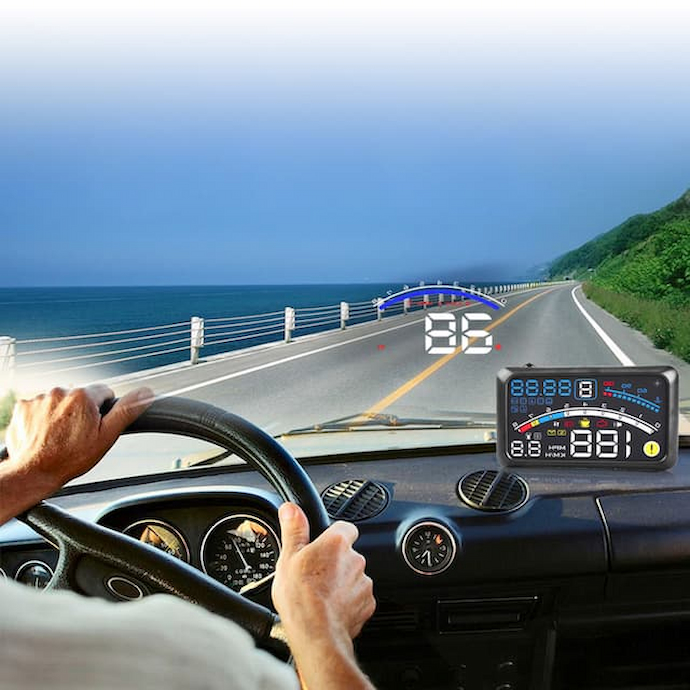
So, what information is displayed by a HUD? This differs between carmakers, with HUD as a standard feature, and aftermarket options that can be installed in all vehicles that don’t have the technology. General driving parameters include:
- Speed and navigation: Current speed and turn-by-turn navigation guidance feature in factory and aftermarket systems.
- Alerts: Safety warnings and alerts, such as lane departure warnings, blind spots, and collision detection, are becoming prevalent in newer HUDs.
- Traffic sign recognition: Many HUDs actively work with other vehicle safety systems to detect traffic signs such as speed limits and speed cameras.
- Fuel, engine temperature, battery status and other vehicle parameters: This is basic information included in all HUDs. The goal is to prevent distractions.
- Infotainment settings: Media information, such as radio stations, volume, current tracks, as well as incoming calls, text messages and other media and phone info are all conveniently displayed in the driver’s line of sight. For context, using phones while driving accounts for roughly one in four car accidents.
Benefits of a Car HUD Display
The main purpose of HUDs is to keep eyes on the road by presenting all relevant data right in front of the driver. This reduces the need to look down, or away (in instrument clusters, infotainment menus or phones) and keeps focus on the road ahead. Moreover, potential hazards and obstacles are detected faster, with more time to safely intervene. An automobile HUD also raises situational awareness by presenting blind spots or lane departures.
Convenience and performance stem from easy access to crucial information, including speed or fuel levels, and can overlay this with navigation data without the need to glance at screens. What is displayed is also customisable to meet personal preferences and needs. This helps drivers optimise driving styles and reduce costs, for instance, with lower fuel use.
Common Types
Vehicle HUD display systems come in several distinct types, differing in size and how they project information:
- Windscreen projection HUDs: This type projects information directly onto the windscreen, creating an image that “floats” in front of the car. Images are clear, legible, and large without causing distractions.
- Dashboard/combiner HUDs: A more affordable and compact option now prevalent in budget and mid-tier car brands, these project data onto a transparent dashboard screen (a combiner) that flips up from the dashboard.
- App/smartphone-based HUDs: These mirror phone images and driving data in apps onto a reflective surface or screen. While the most affordable aftermarket option, this type is convenient for older vehicles.
Features to Look For
Whether you’re buying a new vehicle with a factory head-up display or retrofitting an older car with a phone-based HUD, a few key features provide proper visibility, convenience and a straightforward and useful device.
Ensure that the unit in your car displays crisp, high-resolution images that can be adjusted for brightness and contrast to ensure legibility in all weather and driving conditions. This reduces fatigue and eye strain at night and on longer journeys. Additionally, check that all settings can be customised to your personal preferences, without the need to scroll through unnecessary data.
Ease of use is another key buying factor. HUDs that are simple to install, easy to use, and display relevant data are the ones you’ll enjoy using. Also consider how they work if you wear glasses while driving.
Advanced features like Bluetooth or Wi-Fi connectivity and self-contained power sources (rechargeable lithium batteries, or solar charging) in aftermarket units let you have a wireless experience with the ability to tap into extra features like real-time vehicle diagnostics. Lastly, check whether systems can be integrated with and support Apple CarPlay and/or Android Auto to gain access to calls and the car’s infotainment system.